MenuMeters, maintained.

The CPU, memory, disk and network meters Mac users have kept in their menu bar since 2002. Rewritten in Swift, signed and notarized, and now with one home and a maintainer who answers.

Free. For macOS 26 Tahoe and later, including macOS 27 Golden Gate, on Apple silicon and Intel Macs. A 2.7 MB disk image, signed with a Developer ID and notarized by Apple. Using an older macOS? Here’s what to get.

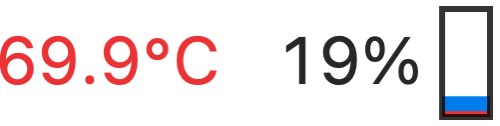
CPU meter: temperature 69.9 °C, a load graph in blue and red, and 19% Memory meter as a pie chart Disk meter with read and write arrows Network meter: traffic graph, arrows, 39.0 KB/s sent and 35.0 KB/s received
Magnified. Every meter on this page was drawn by MenuMeters 3.1.0 on a real Mac.

Four meters. You choose how each one looks.

Turn on the meters you want, then pick a style, colors and an update interval for each. They sit in the menu bar like any other status item, and Command-drag rearranges them.

CPU

Load averaged across the processor or shown for every core, as a graph, a percentage or a bar. Temperature comes from the Apple silicon or Intel sensors. The menu lists the busiest processes, system ones included, and stays live while it’s open.

  • Graph
  • Percentage and bar
  • Every core

Memory

Used and free memory as a pie, a bar, a graph or plain numbers. The menu adds memory pressure, compression, paging and swap, so you can tell a busy Mac from one that’s running out of room.

  • Pie
  • Bar
  • Graph
  • Numbers

Disk

Read and write activity in six icon styles. The menu shows the free space on every mounted volume; choose one to open it in Finder, or hold Option to eject it.

  • Color arrows
  • Arrows
  • Lights
  • Disk arrows

Network

Traffic on your main connection, or one you pick, as arrows, numbers or a graph. The menu lists every interface with its addresses, link speed and totals, and connects VPN and PPP services.

  • Arrows
  • Throughput
  • Graph and throughput

Click a meter for the details.

Each meter opens a menu with the numbers behind it: the processes using the CPU, the space left on every disk, what memory is doing, and the state of every network interface. A link at the bottom of each menu opens Activity Monitor.

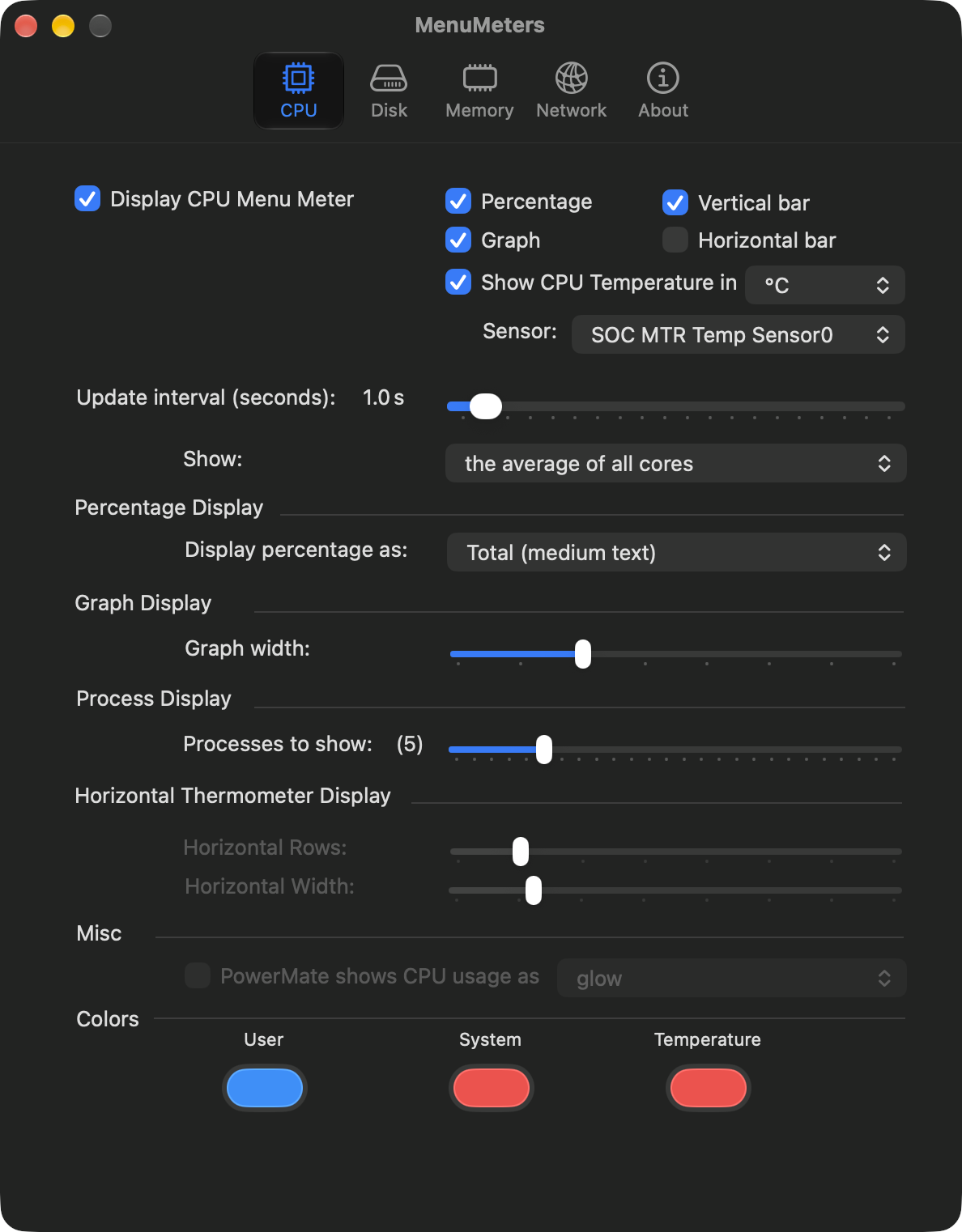
Preferences sit one click away, with a tab for every meter.

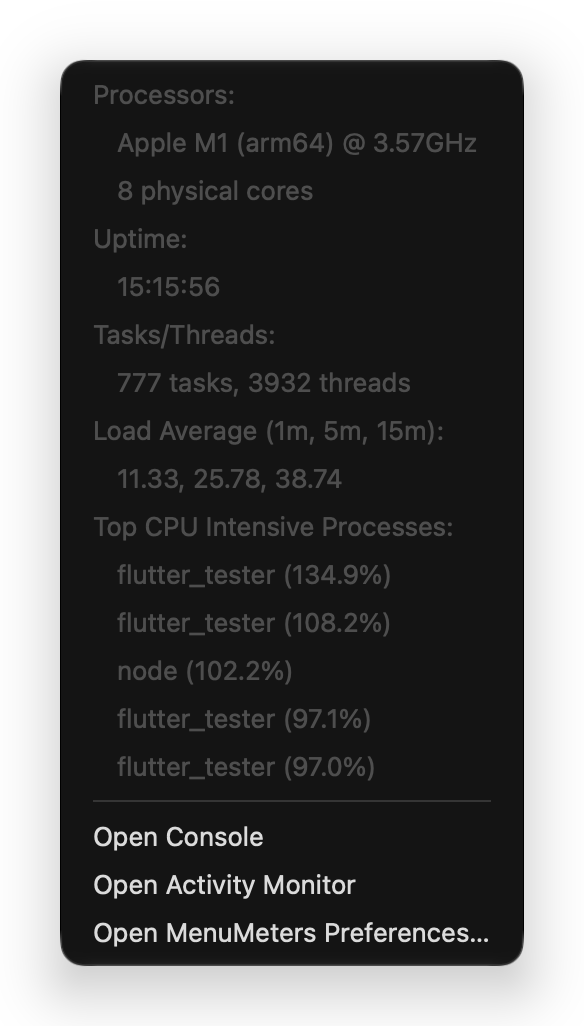
The CPU menu: processor, uptime, tasks and threads, load average, and the five busiest processes
The CPU menu
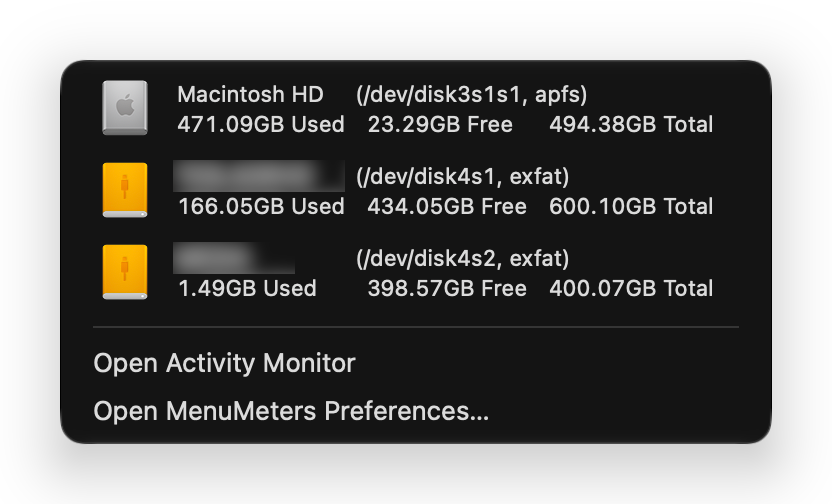
The disk menu: three volumes with their used, free and total space
The disk menu. Two volume names are blurred.
The CPU tab of the MenuMeters preferences
Preferences

Twenty-four years in the menu bar

MenuMeters is older than most of the Macs it runs on. It has had three homes and been rewritten twice, and it has survived because people kept caring about it.

  1. Alex Harper writes MenuMeters

    At Raging Menace, for Mac OS X Jaguar. The meters are menu extras, small plug-ins that run inside the system’s own menu bar process, set up from a pane in System Preferences. It’s free, its source is open under the GPL, and it finds its way into a great many menu bars.

  2. The last Raging Menace release

    Version 1.8.1 arrives in October 2014, for OS X Yosemite.

  3. El Capitan shuts menu extras out, and Yuji Tachikawa steps in

    OS X El Capitan stops loading third-party menu extras, and MenuMeters stops working. Before El Capitan has even shipped, Yuji Tachikawa publishes a version that runs as an ordinary app with status items. For the next decade, that fork is MenuMeters.

  4. A standalone app

    With macOS Catalina, MenuMeters 2.0 leaves System Preferences behind and becomes a signed, notarized app of its own.

  5. Apple silicon

    Big Sur’s new look and the first M1 Macs arrive in the same autumn. MenuMeters ships as a universal app.

  6. 2.1.6.1, then a long pause

    The last regular release for almost five years. In the meantime the project gathers more than 240 forks and more than 100 open issues. Fixes for each new macOS are spread across those forks, and some pull requests have waited since 2021. Version 2.1.7 follows in October 2026, with a community fix for a crash on macOS 27.

  7. gonejack rewrites it in Swift

    Twenty-four years of Objective-C, nib files and compatibility layers become a single Swift app for macOS 26, with its interface built in code.

  8. 3.1.0: audited, fixed, signed

    Before shipping a line of it, I audited the rewrite for backdoors and hidden network access. There were none, but there were bugs: the CPU meter read close to 100% all the time, Intel temperatures never appeared, and the network and disk menus could freeze or show stale numbers. Version 3.1.0 fixes them, restores the license notices and credits, and adds signed automatic updates.

  9. One home

    MenuMeters now lives at github.com/menumeters-osx and here, with issues open and a maintainer reading them.

Why I took this on

Like a lot of people, I kept MenuMeters running by hopping from fork to fork. A new macOS would come out, something would break, and the search would start again. Which fork builds? Which one has the patch for this release? Is the disk image on that page signed by anyone at all? The fixes were out there, but scattered across hundreds of repositories, in pull requests that waited for years.

None of that is anyone’s fault, and I want to be clear about it. Alex Harper wrote MenuMeters and gave it away. Yuji Tachikawa kept it alive for more than a decade, in their own free time, for nothing. gonejack rewrote the whole thing in Swift. Dozens of people sent patches. I’m grateful to every one of them. Free time runs out, and nobody owes anyone a release.

Still, an app this many people rely on deserves better care than that. So I’m putting my time where my mouth is: MenuMeters now has one home, one download, signed updates, and a maintainer who has signed up for the job.

NERv
Maintainer

What I promise

Ready for every new macOS within a week
I test MenuMeters against each new macOS release. If it needs a fix, a signed and notarized update ships within seven days, and reaches you through the app’s own updater.
Free and open source, for good
MenuMeters stays under the GNU GPL, version 2. No price, no ads, no accounts, no analytics, and no paid edition, now or later.
Every issue gets an answer
Bug reports, questions and ideas on GitHub are read and answered, and fixes go out in signed releases rather than in a branch you’d have to build yourself.
One place to get it
This site and github.com/menumeters-osx/MenuMeters are the only official sources. Once it’s installed, updates come to you.

Report an issue

Signed, from download to update

  • Signed and notarized. Every release is signed with the same Apple Developer ID (team T4552AW4A5), runs with the hardened runtime, and is notarized by Apple.
  • Signed updates. MenuMeters checks for updates once a day, using Sparkle, and asks before installing. It accepts an update only if the download is signed with the project’s update key and the app inside is signed by the same developer team.

Install

  1. Download the disk image and open it.
  2. Drag MenuMeters to the Applications folder.
  3. Open MenuMeters. The meters appear in the menu bar, and a welcome page opens once. Each meter’s menu has a link to the preferences.

Coming from an older MenuMeters?

Your settings are copied over the first time 3.1.0 starts. Then delete the old copy: it has a different bundle identifier, so macOS treats it as a separate app with its own login item.

Which MenuMeters for your macOS

Your macOSGet
macOS 27 Golden GateMenuMeters 3.1, from this site. Apple silicon.
macOS 26 TahoeMenuMeters 3.1, from this site. Apple silicon and Intel.
macOS 15 Sequoia, macOS 14 Sonoma, macOS 13 Ventura, macOS 12 MontereyYuji Tachikawa’s MenuMeters 2.1.7.
macOS 11 Big Sur, macOS 10.15 Catalina, macOS 10.14 Mojave, macOS 10.13 High Sierra, macOS 10.12 Sierra, OS X 10.11 El CapitanThe older build on Yuji Tachikawa’s download page: an app on Catalina and Big Sur, a System Preferences pane up to Mojave.
OS X 10.10 Yosemite and earlierAlex Harper’s original, from Raging Menace.

Questions

Why isn’t MenuMeters on the Mac App Store?

App Store apps have to run in Apple’s sandbox, and inside it MenuMeters can’t list other apps' processes, read the Intel temperature sensors or eject disks. Apple silicon temperatures come from an interface that App Review doesn’t allow, and the GPL doesn’t fit the App Store’s terms either. So MenuMeters is distributed the way it always has been: as a free download, now signed and notarized.

Why does it need macOS 26?

The Swift rewrite is built on current AppKit and tested on macOS 26 Tahoe and macOS 27 Golden Gate. Keeping it focused on current systems is what makes the one-week promise possible. Older Macs can keep using an earlier version: the table under Install shows which.

Why does it ask for Accessibility access?

It asks only if you turn on “Opens specific panes” in the preferences. That option lets MenuMeters switch Activity Monitor to the tab that matches the meter you clicked. Leave it off and MenuMeters never asks.

Does it start at login?

On the first launch it adds itself to your login items, once. After that it’s your choice: the Startup checkbox in the About tab turns it on or off, and so does System Settings, under General, then Login Items.

How is it different from Stats?

Stats is a great, actively maintained monitor that covers much more, from battery to fans. MenuMeters does less on purpose: four meters, the look many people have known for twenty years, and very little else. Pick the one that suits you.

Can I build it myself?

Yes. Clone the repository and run ./build-clt.sh; Apple’s Command Line Tools are enough, and Xcode works too. The README has the details.

I found a bug, or I have an idea.

Please open an issue. Include your Mac model and macOS version, and a screenshot if the problem is visible.